Google Business Profile: the introductory guide
If you have one or more local businesses with a physical location, you’ve surely heard of Google My Business, the listing that shows where your business is located on Google Maps when a user searches for you online.
In this introductory guide, you’ll discover how to leverage this tool to achieve maximum visibility on Google and be found more easily by customers.
The topics we’ll cover are:
- What Google Business Profile is (formerly Google My Business)
- What a listing is made up of
- What the benefits of having one are
- How to add your business on Google
- How important reviews are and how to respond to them
- How managing multiple locations works for retailers.
Ready? Let’s get started!
What is Google My Business?
Google My Business (renamed Google Business Profile in 2022) is a free Google tool made available to local businesses so they can manage their online presence on the Google Search Network and on Google Maps.
It’s a sort of free online storefront that lets you show the key information about your business, announce promotions, highlight products, interact with users, and, above all, track the actions users take.
The listing
How the listing is displayed changes depending on the device you use — mobile or desktop — but the content is the same.
Desktop search
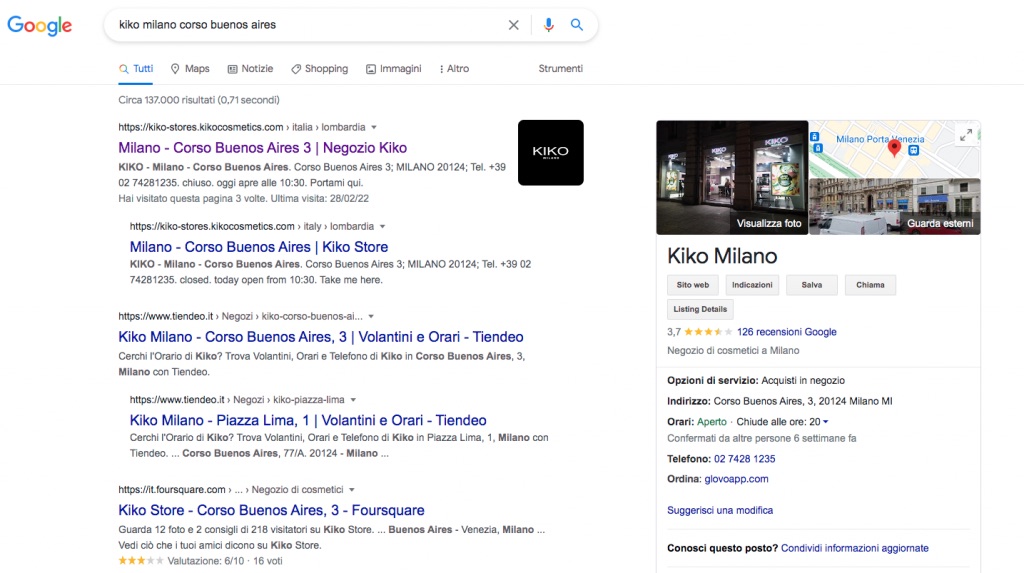
When a user performs a local search with a clear business in mind, such as “brand + city” (for example: boutique la Rose Parma), the Google My Business listing appears to the right of the search results and expands vertically with all the information.
- Business name
- Main category
- Cover photo
- Map with location and pin
- Address
- Opening hours
- Phone number
- Service options
- Products
- Description
- Reviews
- Questions & Answers
- Posts and updates section
Mobile search
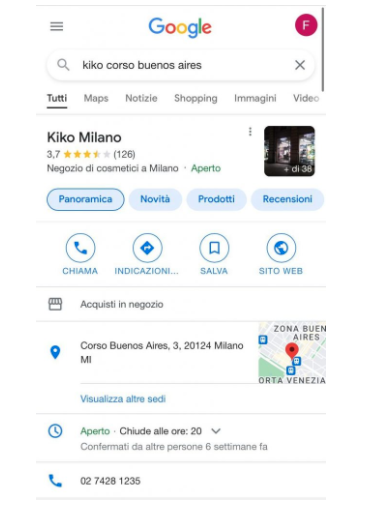
When a user performs a local search from mobile with a clear business in mind, such as Brand + City, the Google My Business listing appears as the first result, even before other websites.
On mobile, the listing is divided into several sections:
- Overview: groups together the business’s main information. Address, opening hours, phone number, service options.
- Reviews: shows the overall rating and the list of user reviews along with the main topics mentioned
- Photos: divided into interior, from the owner, street view
- About: description and attributes
- Products: divided into categories
- Updates: list of posts and updates
Given the sheer amount of information you can add, make sure you fill in every section completely and update this information regularly. Google My Business favors businesses that keep their profile constantly up to date, so don’t miss the chance to get ahead of your competitors.
Benefits
- It’s free: Google My Business is a product that has evolved a great deal over the years. Its origins date back to 2004, when it was still called Google Local. Many features have been added, but it has never become a paid product. Let’s hope the giant keeps it that way.
- It lets users find you: if you’re not on Google, online users have no way of knowing where you are and what you offer.
- Single point of management: a big advantage for users is that all the business’s information is grouped in one place.
- Mobile First: mobile searches have now overtaken desktop searches, and the GMB listing ranks as the first local result, ahead of everything else.
- SEO benefits: a Google My Business listing that’s optimized in every part helps rank your business higher locally than other businesses. Google uses an algorithm to determine the order in which it shows one business to a user rather than another. The main ranking factors are distance, relevance, and prominence, understood as reputation.
- Statistics tracking: within each listing, you can track how your listing is performing on search engines in terms of searches / views, and check what actions users took on the listing: phone calls, requests for directions, or website visits.
- Analyzing strengths and weaknesses: within the Google listing, users can write reviews about their in-store experience, services, products, and staff. Analyzing all the comments left by users is useful for understanding what sets your business apart from competitors and which critical areas you need to improve.
Now that we’ve covered this first overview and understood how important it is to have a presence online on Google, and how to make the most of this channel, let’s get practical.
How do you add your business on Google?
- Sign in with your usual Google account
- Go to https://business.google.com/ and click “Manage now”
- Type your business name into the search field.
At this point, you may run into one of two scenarios:
- 1. There is no listing for your business yet, so you’ll need to create one from scratch.
- 2.A listing for your business already exists, and you’ll need to claim it, that is, take ownership of it.
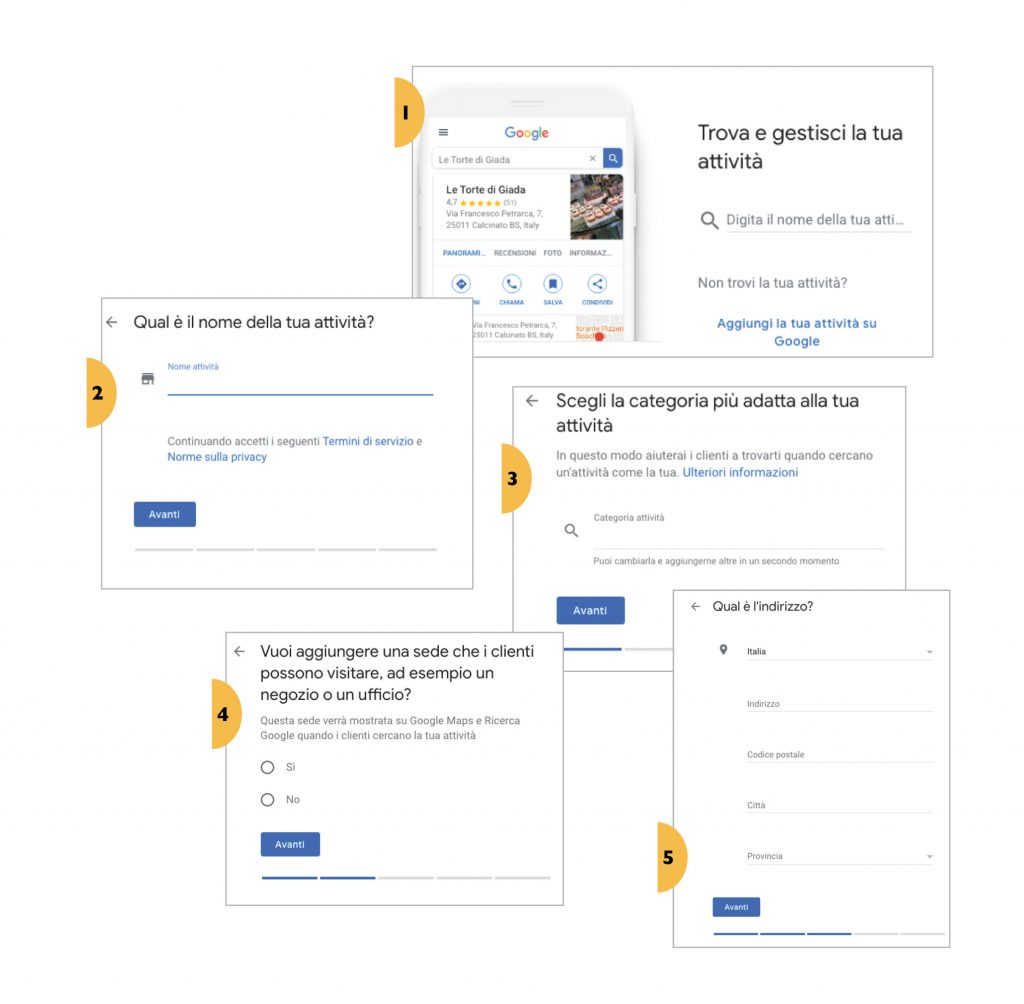
- In both cases, you’ll need to follow the guided process provided by Google, which is quite simple. You’ll need to enter/confirm the address, opening hours, phone number, upload photos, write the description, and so on.
- Once you’ve taken ownership of your business, you’ll need to verify it: you’ll need to prove to Google that you’re actually the owner.
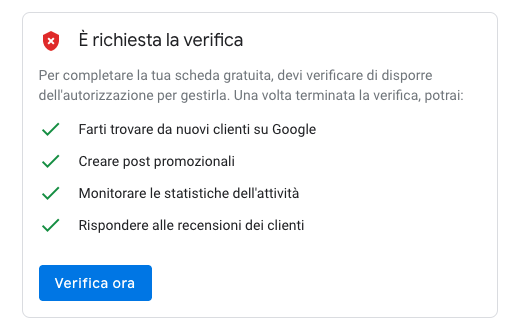
- The verification consists of Google sending you a code through one of 3 methods: a paper postcard, an automated phone call, or email.
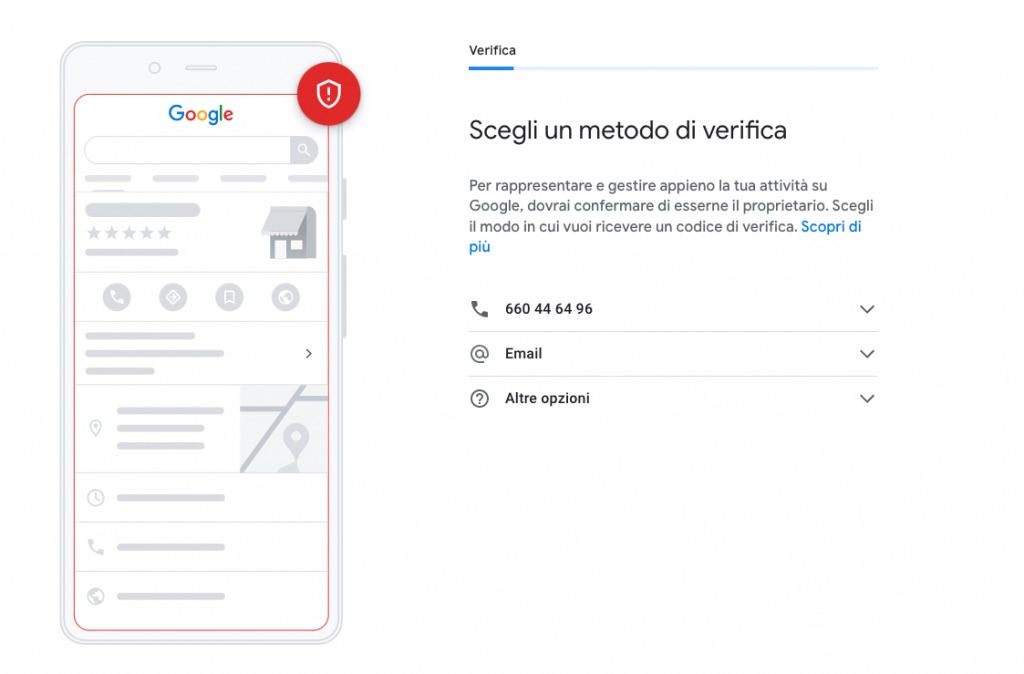
- Once you’ve received the code and entered it in the dashboard, your business will finally be public and visible to users on Google.
- Make sure once again that every section of the listing is complete and up to date.
That’s it! You’re now finally visible on Google!
Being visible on Google, however, isn’t enough — it’s just the starting point; the main part is about building a genuine communication strategy using the features Google My Business makes available: publishing posts, adding products, adding services, uploading images, and, above all, encouraging customers to leave reviews.
An example: let’s imagine we’re in the Christmas season, when most people are hunting for gifts for their loved ones. A full month in advance, a whole series of preliminary activities need to be carried out to prepare for the period: adding special closing hours; uploading gift ideas via the products feature; publishing weekly posts featuring the new Christmas collections. Read our holiday guide here!
Reviews
Reviews are one of the key factors, along with relevance and distance, that Google’s algorithm uses to determine how listings rank on search engines.
All else being equal, a business with a higher rating is favored by Google over a business with negative reviews.
For this reason, it’s important to manage reviews promptly and consistently, responding to both positive reviews and, above all, critical ones. The main benefit of this activity is interaction and building loyalty with users.
Just as important as reviews is managing Q&As, which lets you keep an always up-to-date overview of users’ questions. Unlike reviews, questions can be answered both by the owner and, importantly, by other users. It’s therefore necessary to be quick to respond in order to give users the information they need and prevent other users from providing incorrect answers.
A little trick: this section can be used like the FAQ section of a website — that is, you can add a series of frequently asked questions. For example: Do you offer home delivery? Do you have Click&Collect? And so on.
Managing multiple locations on Google
For chains or retailers with a very high number of locations — more than 10, present worldwide — Google applies slightly different guidelines.
The access dashboard and the features are the same as for individual local businesses; what changes is the verification process.
Having 1,000 stores around the world, creating each listing one by one, and verifying each of them by postcard is certainly not an easily manageable process ……
In fact, Google has wisely decided to streamline this process through two features:
- 1. Bulk upload via Excel of the listings to be created / claimed.
- 2. The bulk account verification process, which involves completing a specific procedure, after which all existing listings and any about to open are verified without sending any postcard.
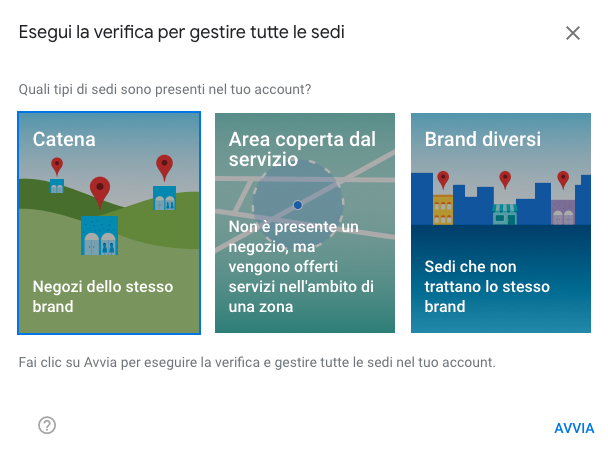
Unfortunately, the bulk verification procedure isn’t immediate, since you necessarily have to go through Google support, and the timelines are generally quite long.
Still, with a bit of patience and precision, you’ll get there in the end!
Conclusion
Well, we’ve reached the end of this introductory guide, whose goal was to give you an overview of just how strategic this tool is for increasing your online visibility and, above all, for getting found online.
There will be other in-depth articles on other topics, so subscribe to the newsletter so you don’t miss any more guides.
See you next time!